
Introduction to NumPy and Matplotlib
Chapter 5: Array manipulation
Array stacking
Well done, apprentice. You have now officially passed our tests.
I will now bestow a bit more knowledge upon you.
You have so far learnt to create np.arrays and also turn them into different shapes.
What if you need to join multiple existing arrays together?
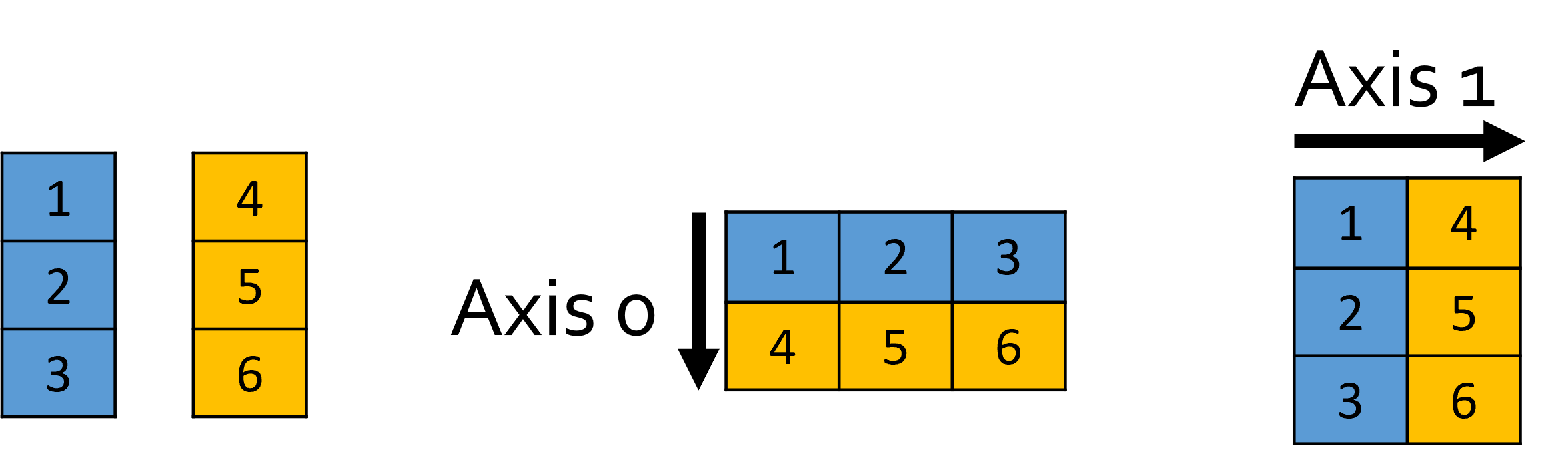
Let’s start with 1D arrays (i.e. vectors). In NumPy, you can stack up multiple 1D arrays along an axis, turning them into a single 2D array! Use np.stack() for this.
>>> x = np.array([1, 2, 3])
>>> y = np.array([4, 5, 6])
>>> z = np.stack((x, y), axis=0)  # axis=0 is the default
>>> print(z)
[[1 2 3]
 [4 5 6]]
>>> z = np.stack((x, y), axis=1)
>>> print(z)
[[1 4]
 [2 5]
 [3 6]]
Note that you can only stack arrays of similar size (or they won’t stack up!)
There are also axis-specific versions of np.stack():
np.vstack(tuple): same asnp.stack(tuple, axis=0)[Vertical stack]np.hstack(tuple): same asnp.stack(tuple, axis=1)[Horizontal stack]np.dstack(tuple): same asnp.stack(tuple, axis=2)[Depth stack]